Patching
Here you can find manual instructions for patching CrossTalk-compatible clients.
MSN Messenger < 4.7.2009
Registry edit
- In Regedit: go to
HKEY_CURRENT_USER\Software\Microsoft\MessengerService - Change the
Serverstring value toms.msgrsvcs.ctsrv.xyz. If it doesn't exist, create it.
Alternatively, you can merge a .reg file (opens in a new tab) that applies these changes for you.
MSN/Windows Messenger 4.7.2009 - 3001
Hex edit
You will need a hex editor for this. We recommend HxD.
- Replace
messenger.hotmail.comwithms.msgrsvcs.ctsrv.xyz - Replace
nexus.passport.comwithpp.login.ugnet.xyz - Replace
gateway.messenger.hotmail.comwithhttpgws.ms.msgrsvcs.ctsrv.xyz(optional, required only to make the HTTP gateway work) - In Regedit: go to
HKEY_CURRENT_USER\Software\Microsoft\MessengerService. If it exists, change theServerstring value toms.msgrsvcs.ctsrv.xyz
MSN Messenger 5+ and Yahoo! Messenger
Reroute DLL
You will need the following:
- Windows XP SP2/Windows 2000 with kernel extensions or later. Wine will work too, YMMV on client compatibility
- The Reroute DLL file which you can download here (opens in a new tab)
- The Reroute configuration file which you can download here (opens in a new tab)
- A PE (portable executable) editor. This guide uses Stud_PE (opens in a new tab).
Steps:
- Place
reroute.dllin your client's installation folder (replace "Program Files" with "Program Files (x86)" on 64-bit systems):Program Files/MSN Messengerfor 5.0 - 8.1Program Files/Windows Live/Messengerfor 8.5- Both
Program Files/Windows Live/MessengerandProgram Files/Windows Live/Contactsfor 2009+ Program Files/Yahoo!/Messengerfor Yahoo! Messenger
- Run Stud_PE with admin privileges and select the executables using File → Open PE File (again, replace "Program Files" with "Program Files (x86)" on 64-bit systems):
Program Files/MSN Messenger/msnmsgr.exefor MSN MessengerProgram Files/Windows Live/Messenger/msnmsgr.exefor Windows Live Messenger- If you are patching WLM 2009+,
wlcomm.exeinProgram Files/Windows Live/Contactsas well
- If you are patching WLM 2009+,
Program Files/Yahoo!/Messenger/YPager.exefor Yahoo! Messenger 5/6/7,Program Files/Yahoo!/Messenger/YahooMessenger.exefor Yahoo! Messenger 8 and newer
You must run Stud_PE as administrator, otherwise you will not be able to save the changes.
Additionally, make sure the client is not running in the background (check Task Manager) before proceeding.
Stud_PE should look something like this: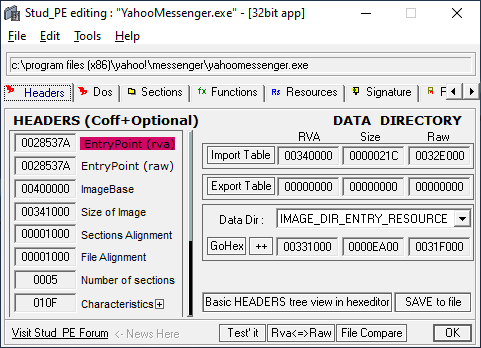
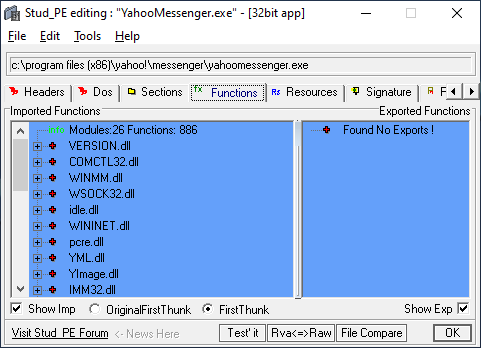
- In the Functions tab:
- Right-click on the left hand window → select "Add New Import"
- Click "Dll Select" → select
reroute.dllfrom your client's Program Files folder - Click "Select func." → choose "ImportMe" → click "OK"
- Click "Add to List" → then click "ADD"
- Save the changes by clicking "OK"
- Configure Reroute:
- Copy the
sample-reroute.inifile into your client's installation folder, and rename it to<your client executable>.exe-reroute.ini:msnmsgr.exe-reroute.inifor MSN Messenger- If you are patching WLM 2009+, create
wlcomm.exe-reroute.iniinWindows Live/Contactsas well
- If you are patching WLM 2009+, create
YPager.exe-reroute.inifor Yahoo! Messenger 5 and 6,YahooMessenger.exe-reroute.inifor Yahoo! Messenger 7.5 and 8
- Edit the config file and (on line 12) set
typetomsnfor MSN Messenger/Windows Live Messenger, oryahoofor Yahoo! Messenger - If using Windows Live Messenger 2011/2012, edit the config file, and change
enable = 1under the[idcrl]section.
- Copy the
- Assuming you've done everything correctly, you should now be able to sign in!
Yahoo! Messenger 5/6 (alt. method for old systems)
Registry edit
(This patching method is only applicable if you are using Windows XP SP1 or older):
- In Regedit: go to
HKEY_CURRENT_USER\Software\Yahoo\Pager - Change the
Conn Server,socket server, andHost Namestring values toms.msgrsvcs.ctsrv.xyz, and change theIPLookupvalue to127.0.0.1If they do not exist, create them
Alternatively, you can merge a .reg file (opens in a new tab) that applies these changes for you
AOL Instant Messenger/ICQ
Client setting
Click Setup, then Connection, and change the host name to ms.msgrsvcs.ctsrv.xyz